

Insert Hyperlink
- 28 Mar 2024
- 1 Minute to read
-
Print
-
DarkLight
Insert Hyperlink
- Updated on 28 Mar 2024
- 1 Minute to read
-
Print
-
DarkLight
Article summary
Did you find this summary helpful?
Thank you for your feedback!
Insert Hyperlink
When you click on the link button,  a new hyperlink a popup screen opens:
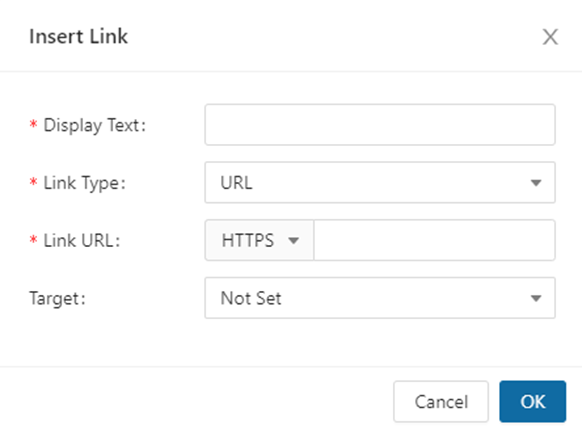
- Display Text: this is what you highlighted to create the Link
- Link Type (select from the Dropdown):
- URL: Allows you to enter a URL that will re-direct you to a given webpage
- The protocol dropdown defaults to http://, but allows for alternate protocols if applicable
- E-mail: Will open an e-mail that has been uploaded to FoundationHub
- System: Will open an Article (page) that was created in FoundationHub
- Document: Will open a PDF document that has been uploaded to FoundationHub
- Initiative: Will open an Initiative that has been uploaded to FoundationHub
- URL: Allows you to enter a URL that will re-direct you to a given webpage
3. Target: The target specifies where to open the linked document/URL
- Not Set: Defaults to opening the link in the same frame as it was clicked
- New Window (_self): Opens the linked document in the same frame as it was clicked
- New Window (_blank): Opens the linked document in a new window or tab
- New Window (_parent): Opens the linked document in the parent frame
- New Window (_top): Opens the linked document in the full body of the window
Was this article helpful?