

Multi-Level Donor Approval of DonorSphere Grants
- 26 Feb 2026
- 1 Minute to read
- Print
- DarkLight
Multi-Level Donor Approval of DonorSphere Grants
- Updated on 26 Feb 2026
- 1 Minute to read
- Print
- DarkLight
Article summary
Did you find this summary helpful?
Thank you for your feedback!
Currently each grant submitted through DonorSphere goes directly to FoundationHub for your review. Multi-Approval Feature enables donors and/or advisors on a Fund to submit grants which are first reviewed / approved by appropriately permissioned donors/advisors, who are linked to that Fund, in DonorSphere before the grant recommendations are submitted to FoundationHub for your review.
To set the number of approvals required, go to the Fund’s profile and set the value in the field highlighted below:
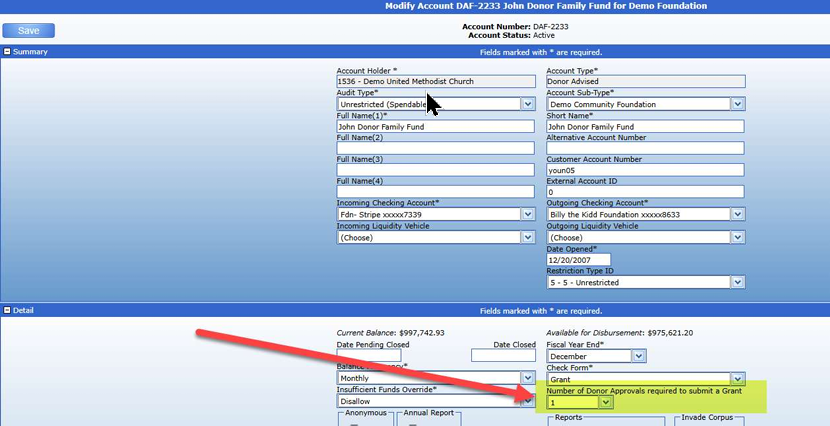
The default for all existing and newly created funds will be 1 approval, so that until any changes are made by you, a grant, once submitted, will go directly to FoundationHub.
NOTE: The approval levels are not limited by the number of interested parties linked to the Fund with grant recommending permissions – so you need to ensure that there are sufficient linked interested parties to support the number of approval levels that you set.
If the number of approvals is greater than 1, then when a grant is submitted via DonorSphere, this grant will go into a pending status and will appear in the “Pending” section (see image below) for the other grant recommenders on the Fund thereby allowing them to review the submitted grants and either approve or reject the submitted grant(s).
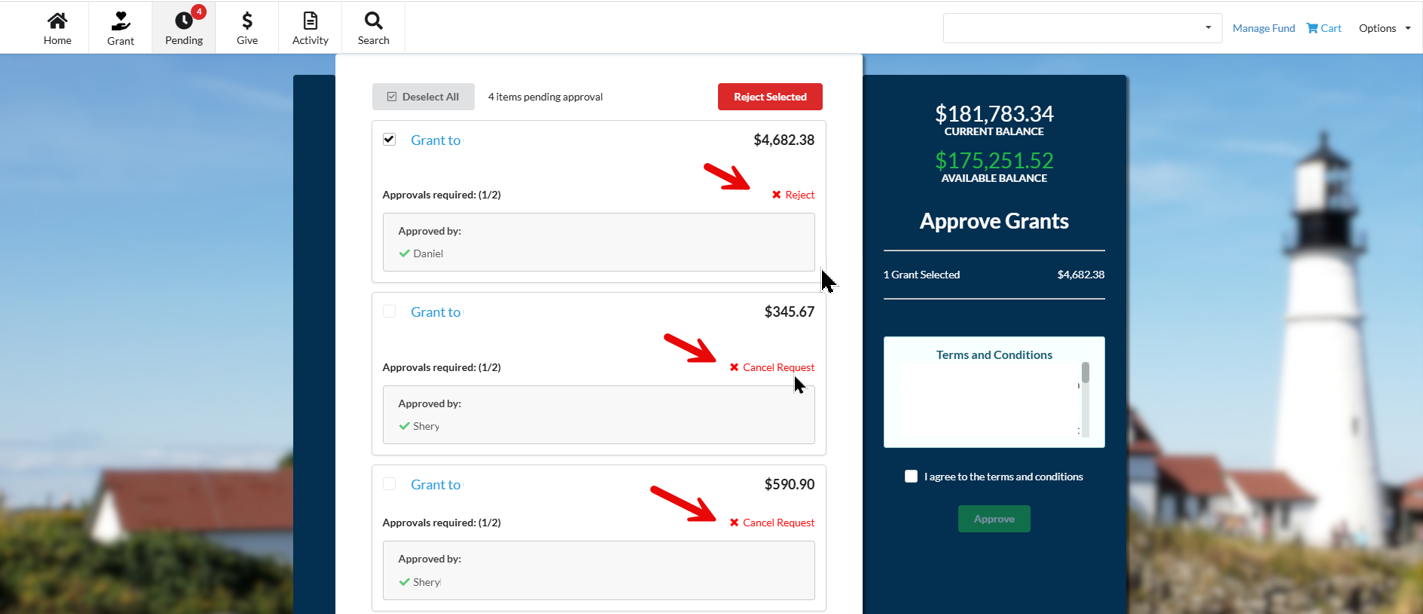
Two new email templates have been created to support this new feature:

DS – New Joint Approval Notification: this is an email that will be sent to the other linked interested parties on the Fund who have the right to give their approval to these grants, to notify them that there are grants in Donorsphere awaiting their approval.
DS – Joint Approval Reminder: this is an email that can be configured to send a reminder to linked interested parties that there are grants in DonorSphere awaiting their approval.
NOTE: As with all emails within FoundationHub, the email templates need to be edited and published for them to be generated. Until the further level of approval has been given the Donor who originally entered the grant will see that grant in their cart and will not be able to take any further action on it other than rejecting it.
Was this article helpful?