Giving Basket
Previously, each grant in DonorSphere had to be submitted individually through a multi-step process. Donors submitting multiple grants were required to repeat the full workflow for each recommendation.
This release introduces the Giving Basket to streamline the process. Donors can now:
Add multiple grants to a Basket.
View all selected grants in the Basket summary.
Remove grants as needed.
Submit all grants in one checkout process.
Available balance minus Basket items.
Multi Approver
Receive reminder emails when items have been left in the Basket.
This New feature is a Preference that FidTech can activate or deactivate at any time, just by enter a support ticket requesting so.
Once activated, to add an item to a Basket simply go through the normal grant process and at the bottom of the page you see two options, “Add to Basket” & “Check Out”. Checking out will proceed as normal to the confirmation page and will submit the request, while adding to Basket will add the grant to the Basket and you can continue adding more to the Basket
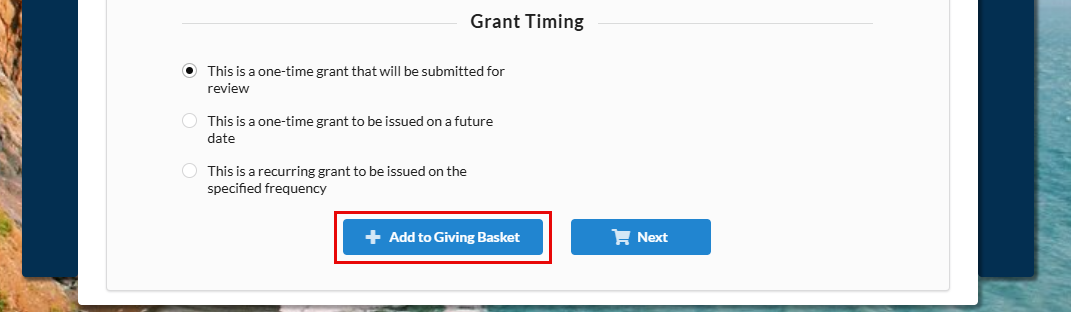
Note that for all submitted grants to be included in a single email, the bulk email features released in the last release need to be used. This refers to adding a dynamic table to the email template as seen in the screenshot below

The grant submission email template will need to be updated to include this table to allow for the details of multiple submitted grants to be displayed in a single email.
Add Multiple Grants to Basket
Multiple grants can be added to the Basket, which updates numerically based on the amount of grants added. Clicking on the Basket icon will direct you to the Basket page.

Basket Summary
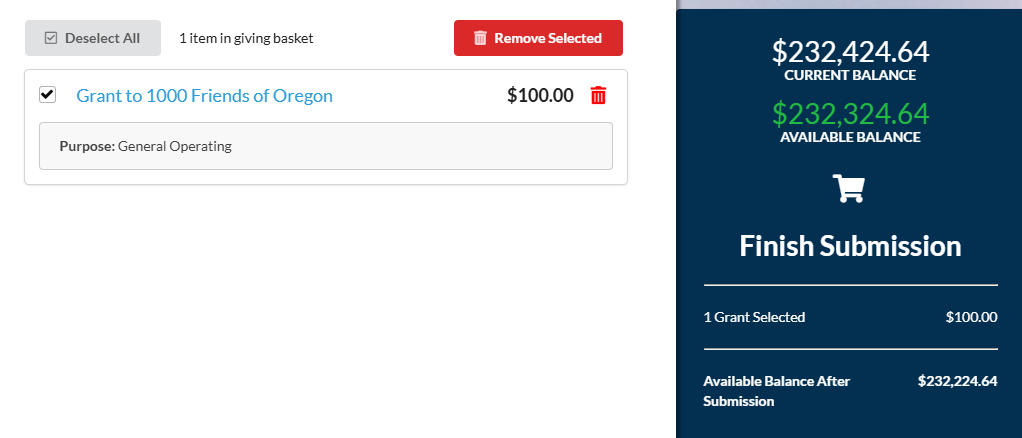
The Basket summary displays the grants and there is the ability to remove a grant from the Basket either in bulk or individually.
Grant Summary
Available Balance minus Basket Items
Giving Basket will now provide donors with an ability to see, at a glance, their available balance assuming they go ahead and checkout.

Giving Basket Emails
Items left in the Basket will trigger a reminder once items have been left in the Basket for 24 hours. Additionally, a consolidated list of checkout items will trigger upon checkout for multiple grants. The reminder template needs to be updated and published in FoundationHub for it to trigger. Basket reminder emails will only send once to avoid being filtered as spam.
