

New Bank Account Screens
- 26 Jun 2023
- 1 Minute to read
- Print
- DarkLight
New Bank Account Screens
- Updated on 26 Jun 2023
- 1 Minute to read
- Print
- DarkLight
Article summary
Did you find this summary helpful?
Thank you for your feedback!
New Bank Account Screens
The Bank Account administration screens have been re-written to provide greater functionality to support electronic payments such as ACH and default payment methods for grantees/vendors.
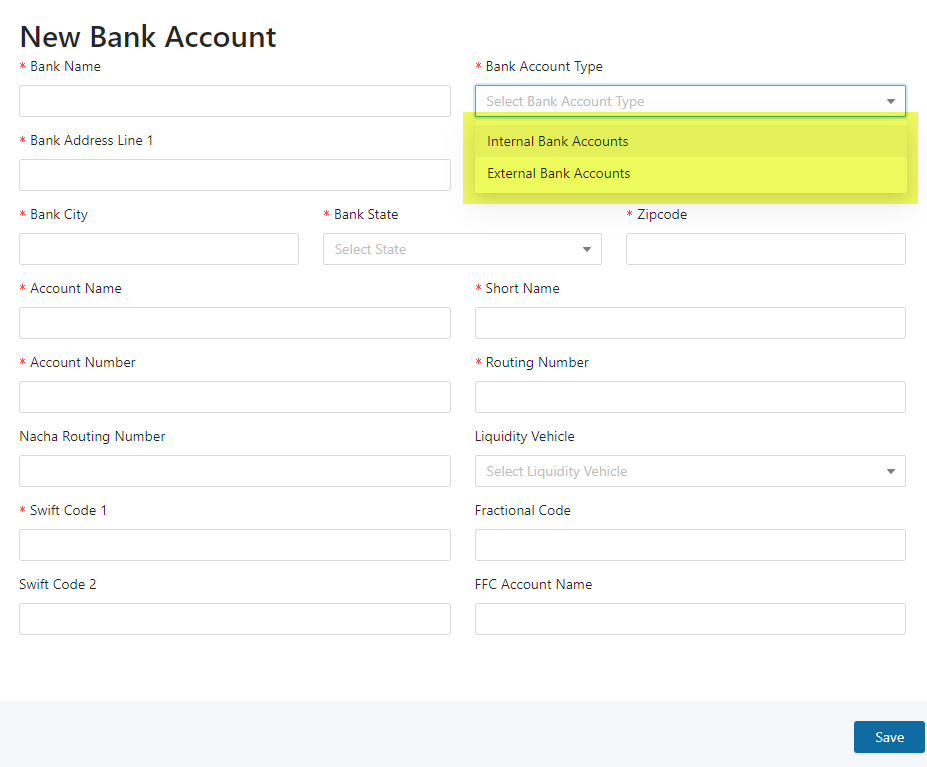
A new field has been added – Bank Account Type.
Bank Account Type allows bank accounts to be segregated on user defined criteria. In the first instance, all bank accounts in the system have been classified as either Internal Bank Accounts or External Bank Accounts.
Internal Bank Account – this category was applied to all bank accounts that were CHECK, ACH, WIRE or DEPOSIT eligible.
External Bank Account – this category was applied to all bank accounts that were NOT CHECK, ACH, WIRE or DEPOSIT eligible.
Note that different permissions can be applied to each category. At conversion, permissions are the same as for legacy bank accounts, i.e., roles that could create bank accounts can still create bank accounts and roles that could approve bank accounts can still approve bank accounts.
For External Bank Accounts, new fields have been added:
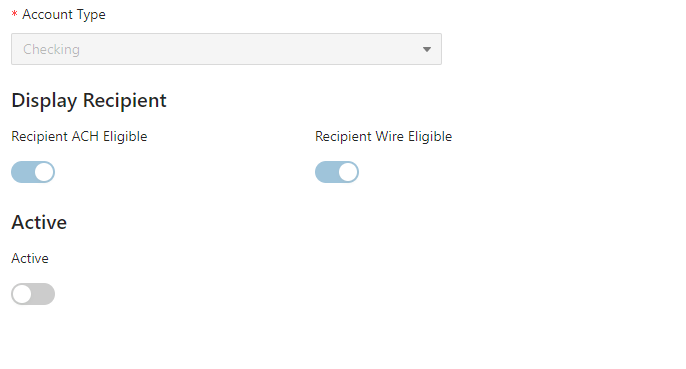
By default, all recipient eligible bank accounts have been set to be both Recipient ACH and Recipient Wire Eligible.
ACH Recipient Eligible Bank Accounts can be selected on the transaction screens and feed into NACHA file generation.
Please review your bank accounts and contact your customer service representative for any changes required to the default settings that have been applied.
The new admin screen contains dynamic filters to filter bank account selection.

Was this article helpful?