Transaction Processing
Transaction forms are used to input changes into the system. These forms include grant disbursements (to create grants), cash receipts (to recognize contributions) and more. To find transaction forms:
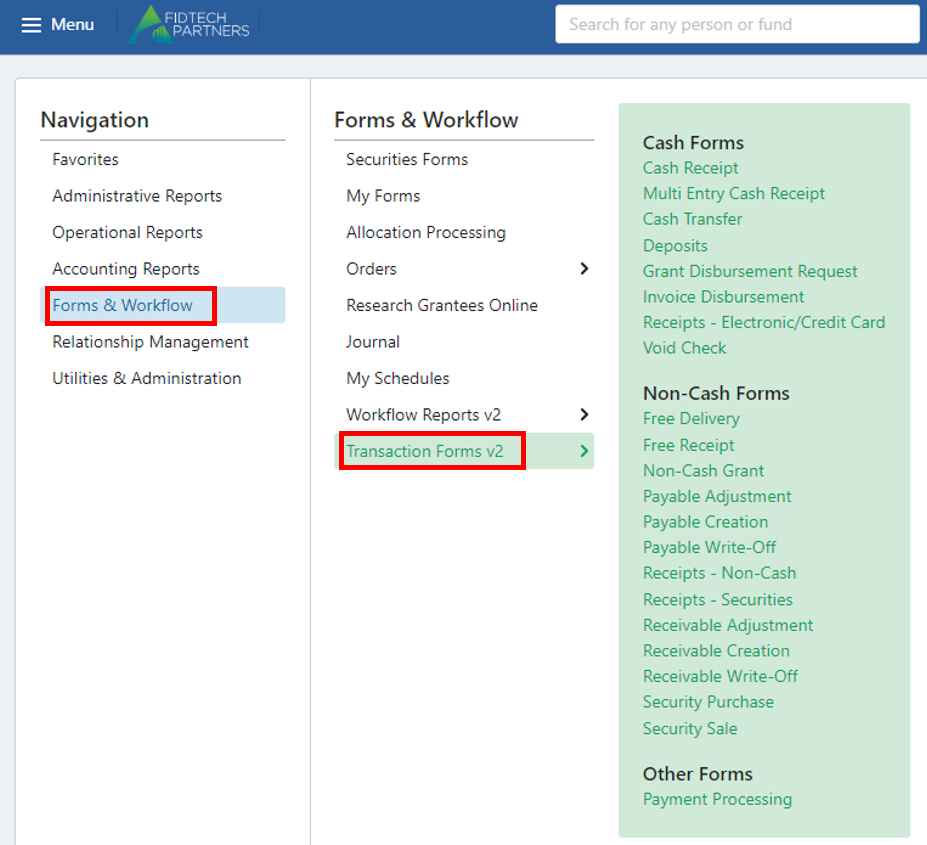
The above list is a sample list of transaction forms available on our system. Each of their purposes are discussed below, and more information on the most-used forms is available in the following sections of this help document.
Please note that the naming of these forms varies depending on your organization’s settings, so the forms listed below may not be exact to your page. However, the forms' purposes remain the same regardless of name. If you have any questions about the naming of the forms on your site, please reach out to your support representative.
Cash Forms:
Cash receipt: to account for a cash contribution to a fund (typically to update the balance of a fund once a check or wire has been received by your organization).
Cash transfer: to transfer money between two funds, typically managed by the same donor. Also called Interfund Transfer or Transfer.
Deposits: to input large deposits of cash intended for multiple funds. Cash receipts can be used to allocate portions of the deposit to specific funds.
Grant disbursement request: to make a grant from a specific fund to a grantee, typically at the request of the donor. This is the same form as the Disbursement Request form.
Invoice disbursement: to pay expenses to vendors. Can also be used to reverse a cash receipt (typically used when the cash receipt is booked incorrectly in the system).
Multi entry cash receipt: to account for multiple cash contributions to the same fund from the same donor.
Receipts – electronic/credit card: to account for a donor’s contribution to a fund by e-check or credit card payment.
Void check: to void a check that has already been created through a transaction (such as a grant disbursement).
Non-Cash Forms:
Free delivery: to account for the removal of assets from a fund. Can also be used to reverse a free receipt or receipt – securities.
Free receipt: to account for a contribution from a donor in a form other than cash. This can also be used to reverse a free delivery transaction.
Non-cash grant: to send security disbursements to Grantees. Similar to grant disbursement form.
Payable adjustment: to adjust the amount of an existing payable
Payable creation: to create a payable for a fund (typically to ensure that a donor making a recurring grant has the funds to continue making the grant).
Payable write-off: to remove a payable from a fund.
Receipts – securities: to account for a donor’s contribution of a security (such as a stock gift). This is similar to a Free Receipt form.
Receivable adjustment: to update the balance of a receivable.
Receivable creation: to create a receivable for a fund (typically to account for a donation pledge).
Receivable write-off: to remove the balance of an existing receivable.
Security Purchase: to record the purchase of an asset using foundation funds.
Security Sale: to record the sale of an asset already in the foundation’s possession.
Payment processing: to create and print checks (usually for a grant or invoice disbursement).