

About DonorSphere Preferences
- 28 Mar 2024
- 1 Minute to read
- Print
- DarkLight
About DonorSphere Preferences
- Updated on 28 Mar 2024
- 1 Minute to read
- Print
- DarkLight
Article summary
Did you find this summary helpful?
Thank you for your feedback!
About DonorSphere Preferences
In this document, you can learn to fully understand how to customize your DonorSphere environment with DonorSphere Preferences. Whether you want to change your homepage view, accept different payment types, receive various notifications, and so much more, this is your how-to guide on all of it. With this document, FidTech has laid out step by step instructions to complete any task, allowing you to create an environment tailor made to fit your goals and mission.
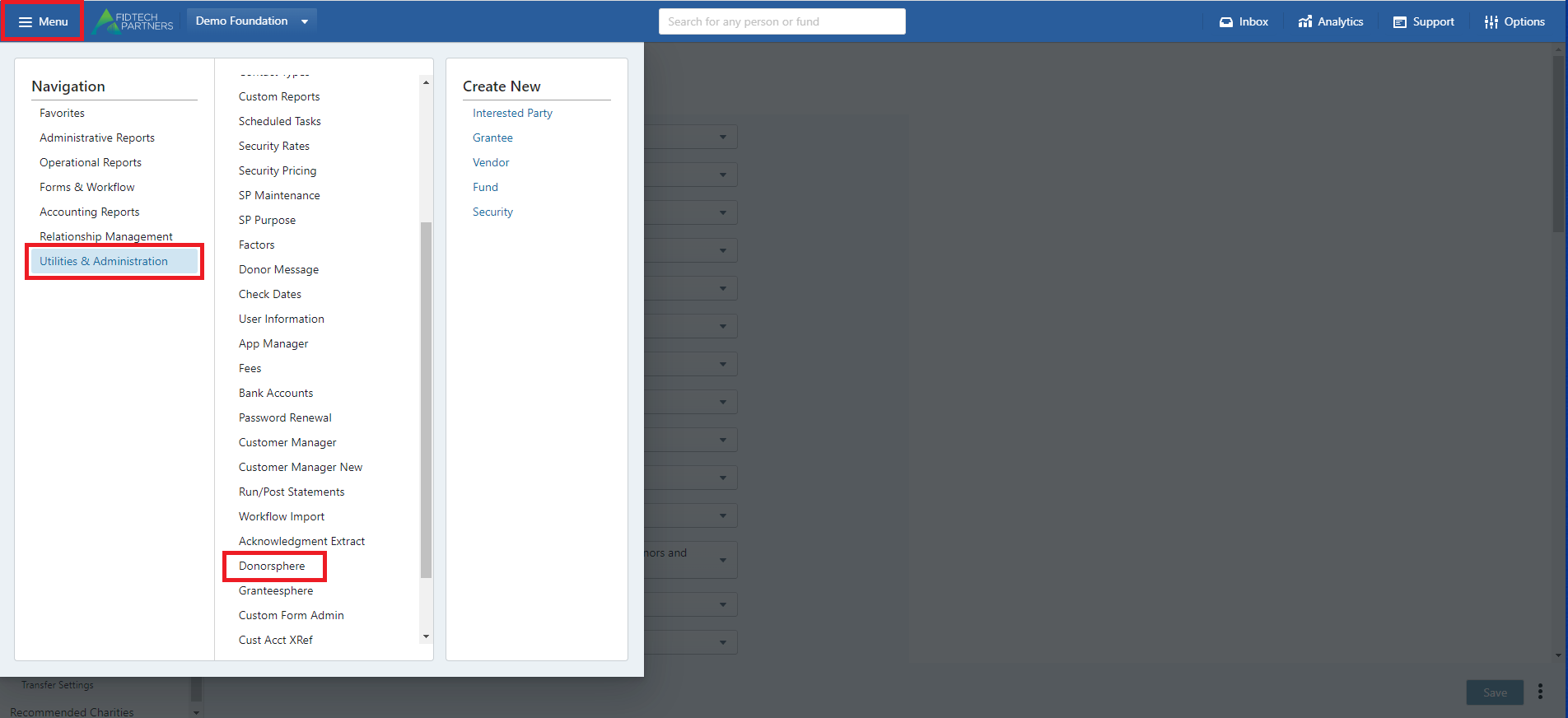
To access your DonorSphere Preferences from the FoundationHub site, simply click “Menu,” “Utilities & Administration,” and then “DonorSphere.”
Then, once you reach this page below, click “Preferences.” Preferences can be used for general preferences, gift settings, grant settings, distribution settings, and transfer settings. Select options via the dropdown on each field and click save on the bottom right.
.png "image(128).png")
Was this article helpful?