

Transaction (GL) Codes
- 20 Jun 2023
- 1 Minute to read
-
Print
-
DarkLight
Transaction (GL) Codes
- Updated on 20 Jun 2023
- 1 Minute to read
-
Print
-
DarkLight
Article summary
Did you find this summary helpful?
Thank you for your feedback!
Transaction (GL) Codes
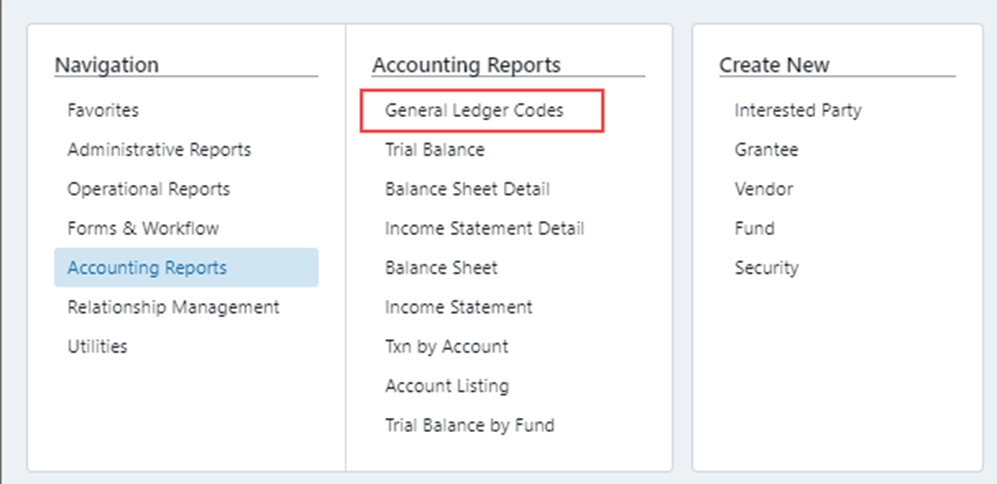
To manage General Ledger codes that are used for each of the transaction types, you will go to Utilities > General Ledger Codes:
Within General Ledger Codes, you will have the option to:

- Create or Edit Income or Disbursement Codes –
All transaction forms have a Transaction Type Code associated with them, which is the following:
- ROC = Cash Receipt
- DIS = Grant Disbursements/Invoice Disbursements
- XFRMP = Transfers
- VOID = Void Check
- FRD = Free Delivery
- FRR = Free Receipt
When you are doing a code mapping, a “1” will have a positive impact on the cash for the account, and a “-1” will have a negative impact.
For example below, “Code 5000 – Community” is set with Disbursement – DIS there is a negative impact and on a Cash Receipt (ROC) there is a positive impact (please see areas highlighted below).
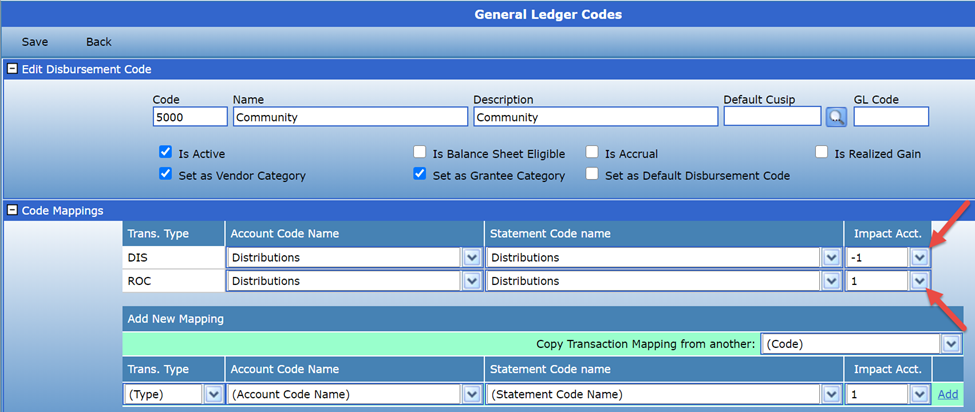
Account Code Name is how the transaction will appear on the Fund reports, and Statement Code name is how the transaction will appear on the statements.
GL Code is where you will link the Income or Disbursement Code to an existing GL Code.
2. Create or Edit GL Code Types – here you can create or edit GL Code Types to be used when creating a new GL Code.
3.Create or Edit Account & Statement Code Names – here you can create or edit Account & Statement Code Name.
Was this article helpful?